> ## Documentation Index
> Fetch the complete documentation index at: https://docs.imagine.art/llms.txt
> Use this file to discover all available pages before exploring further.

> ImagineArt's Imagine You, a character reference model in the Edit tab.

# Imagine you

<div style={{background: "linear-gradient(135deg, #0d0016 0%, #18003a 55%, #08000f 100%)", borderRadius: "20px", padding: "3.5rem 3rem 3rem", marginBottom: "2.5rem", overflow: "hidden", position: "relative"}}>
  <div style={{position: "absolute", inset: "0", background: "radial-gradient(ellipse at 30% 60%, rgba(124,0,251,0.22) 0%, transparent 55%), radial-gradient(ellipse at 85% 15%, rgba(146,73,255,0.14) 0%, transparent 50%)", pointerEvents: "none"}} />

  <div style={{position: "relative"}}>
    <div style={{display: "flex", gap: "0.5rem", marginBottom: "1.5rem", flexWrap: "wrap"}}>
      <span style={{background: "rgba(124,0,251,0.25)", border: "1px solid rgba(124,0,251,0.5)", borderRadius: "100px", padding: "0.3rem 1rem", fontSize: "0.72rem", color: "#c084fc", fontWeight: "500", letterSpacing: "0.06em"}}>IMAGE MODEL</span>
      <span style={{background: "rgba(255,255,255,0.06)", border: "1px solid rgba(255,255,255,0.12)", borderRadius: "100px", padding: "0.3rem 1rem", fontSize: "0.72rem", color: "rgba(255,255,255,0.45)", fontWeight: "400"}}>by ImagineArt</span>
    </div>

    <h1 style={{fontSize: "clamp(2.5rem, 5vw, 3.75rem)", fontWeight: "700", color: "#ffffff", lineHeight: "1.1", letterSpacing: "-0.025em", margin: "0 0 1.1rem 0"}}>Imagine You</h1>
    <p style={{fontSize: "1.1rem", color: "rgba(255,255,255,0.52)", maxWidth: "580px", lineHeight: "1.7", marginBottom: "2.25rem"}}>ImagineArt's own character reference model. In-app it's described as "Detailed, expressive, and unique character reference," and it's only available in **Edit**.</p>

    <div style={{display: "flex", gap: "0.75rem", flexWrap: "wrap"}}>
      <div style={{background: "rgba(255,255,255,0.06)", borderRadius: "14px", padding: "0.875rem 1.5rem", border: "1px solid rgba(255,255,255,0.1)"}}>
        <div style={{fontSize: "0.62rem", color: "rgba(255,255,255,0.32)", textTransform: "uppercase", letterSpacing: "0.1em", marginBottom: "0.3rem"}}>Aspect ratios</div>
        <div style={{fontSize: "1rem", color: "#ffffff", fontWeight: "600"}}>5</div>
      </div>

      <div style={{background: "rgba(255,255,255,0.06)", borderRadius: "14px", padding: "0.875rem 1.5rem", border: "1px solid rgba(255,255,255,0.1)"}}>
        <div style={{fontSize: "0.62rem", color: "rgba(255,255,255,0.32)", textTransform: "uppercase", letterSpacing: "0.1em", marginBottom: "0.3rem"}}>Credits</div>
        <div style={{fontSize: "1rem", color: "#ffffff", fontWeight: "600"}}>90 per image</div>
      </div>

      <div style={{background: "rgba(255,255,255,0.06)", borderRadius: "14px", padding: "0.875rem 1.5rem", border: "1px solid rgba(255,255,255,0.1)"}}>
        <div style={{fontSize: "0.62rem", color: "rgba(255,255,255,0.32)", textTransform: "uppercase", letterSpacing: "0.1em", marginBottom: "0.3rem"}}>Available in</div>
        <div style={{fontSize: "1rem", color: "#ffffff", fontWeight: "600"}}>Edit only</div>
      </div>
    </div>
  </div>
</div>

## Character reference, by ImagineArt

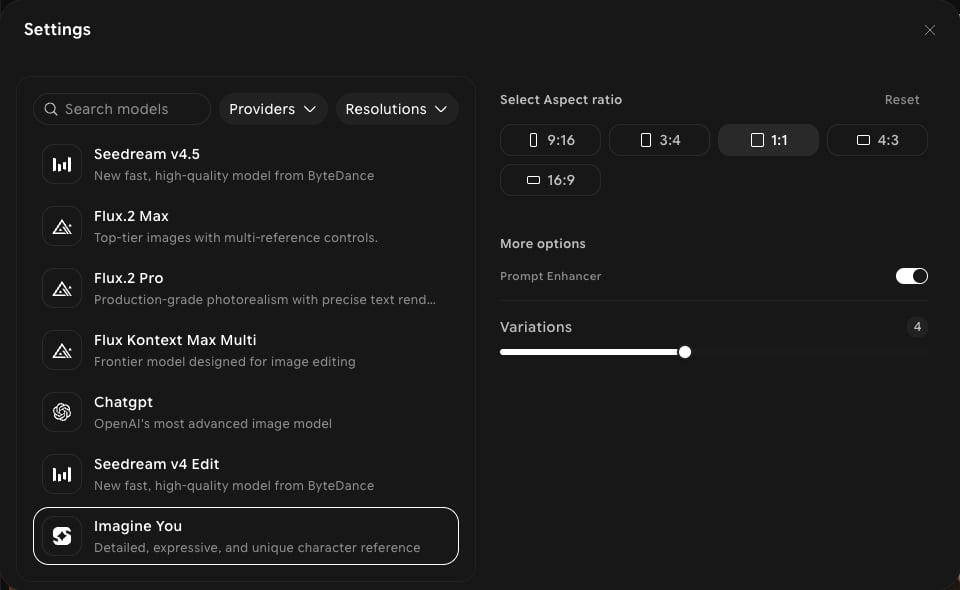
Imagine You doesn't appear in the **Create** picker — you'll find it at the end of the model list in the **Edit** tab. It's built for character reference: start from a reference image of a character and generate detailed, expressive new images of them.

## Capabilities

<CardGroup cols={3}>
  <Card title="Character reference">
    Built around a reference image of a character.
  </Card>

  <Card title="Expressive results">
    Positioned in-app for detailed, expressive, and unique images.
  </Card>

  <Card title="Five aspect ratios">
    9:16, 3:4, 1:1, 4:3, and 16:9.
  </Card>
</CardGroup>

## Settings in ImagineArt

| Setting | Options |
| - | - |
| **Aspect ratios** | 9:16, 3:4, 1:1, 4:3, 16:9 |
| **Resolution** | No resolution setting shown |
| **More options** | **Prompt Enhancer**, **Variations** (up to 4) |
| **Credits** | 90 per image, shown in the model tooltip |

<Frame>
  <img src="https://mintcdn.com/imagineart/iwPYCmLZyCePtcU9/images/ai-models/imagine-you-step-01.png?fit=max&auto=format&n=iwPYCmLZyCePtcU9&q=85&s=0ee89bc9aa2959da6fb77876fe6f143e" alt="Edit settings panel with Imagine You selected, showing five aspect ratios, Prompt Enhancer, and Variations" width="960" height="590" data-path="images/ai-models/imagine-you-step-01.png" />
</Frame>

## How to use

<Steps>
  <Step title="Open Edit">
    In the sidebar, click **Image**, then switch to the **Edit** tab in the prompt bar.
  </Step>

  <Step title="Select the model">
    Click the model button in the prompt bar (it shows the current model and aspect ratio) to open **Settings**, then choose **Imagine You**.
  </Step>

  <Step title="Add your character">
    Click **Add references** to add a clear image of the character.
  </Step>

  <Step title="Describe the scene">
    Write the scene, outfit, pose, or expression you want.
  </Step>

  <Step title="Generate">
    Click **Generate** and review the output.
  </Step>
</Steps>

<Tip>
  Hover a model in the picker to see its current credit cost and supported aspect ratios before you generate.
</Tip>

## Compare models

| Model | Available in | Aspect ratios | Credits (per image) |
| - | - | - | - |
| **Imagine You** | Edit | 5 | 90 |
| [ImagineArt 2.0](/ai-models/image/imagineart-2-0) | Create (Edit as ImagineArt 2.0 Edit) | 14 | 25 |
| [Nano Banana Pro](/ai-models/image/nano-banana-pro) | Create, Edit | 10 | See tooltip |


This documentation is built and hosted on [Mintlify](https://mintlify.com), a developer documentation platform.