> ## Documentation Index
> Fetch the complete documentation index at: https://docs.imagine.art/llms.txt
> Use this file to discover all available pages before exploring further.
# How to Cancel Your Subscription
> Step-by-step guide to cancelling your ImagineArt subscription on web or mobile, and what happens after cancellation.
## Cancelling on the web
Go to [imagine.art](https://www.imagine.art) and log in with your credentials.
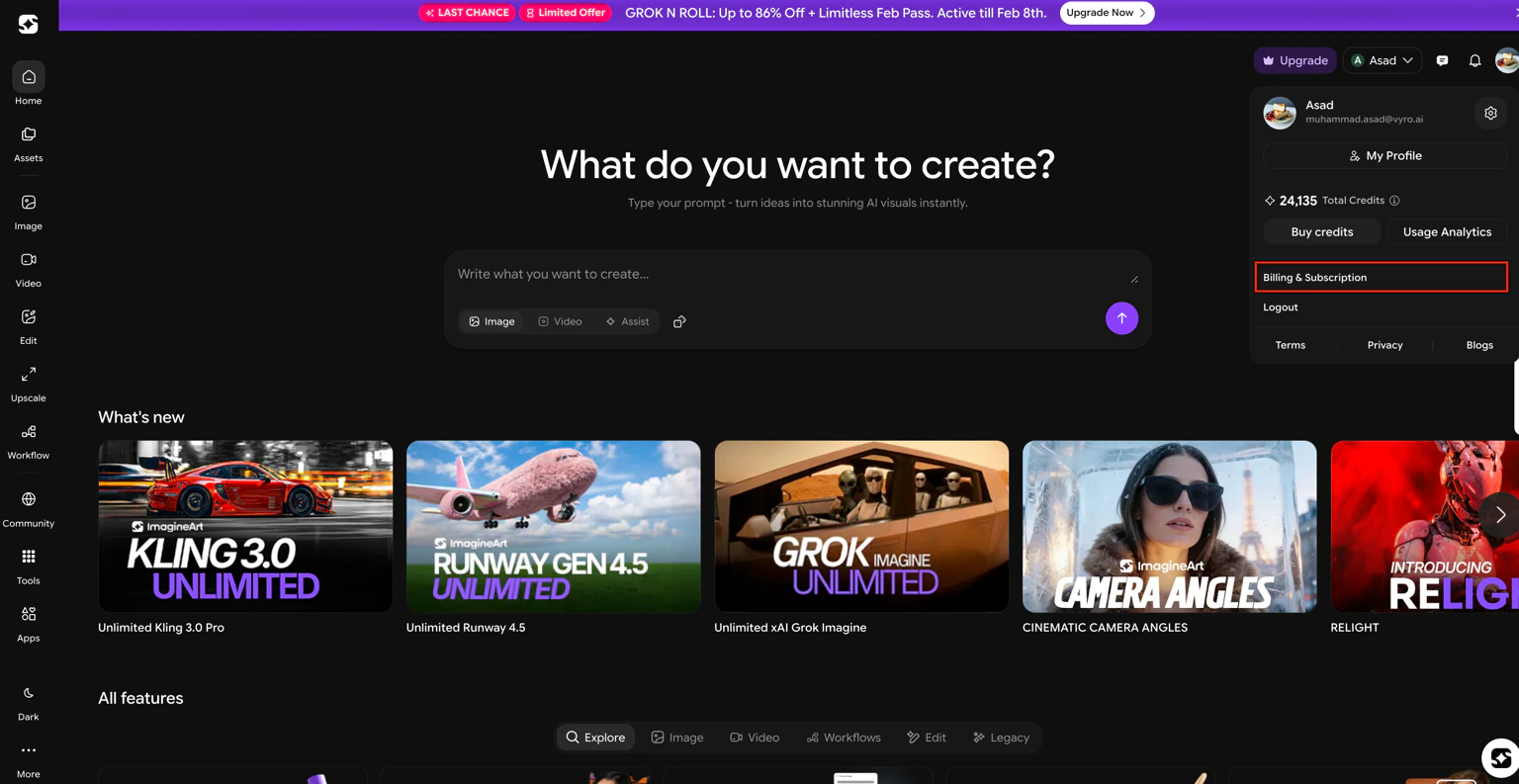
-3.avif?fit=max&auto=format&n=G1YuoRh-0vn2i0bY&q=85&s=96b3132d283056a9bff8df50d9a93a69) Click your profile picture in the top-right corner and select **Billing & Subscription** from the dropdown menu.
Click your profile picture in the top-right corner and select **Billing & Subscription** from the dropdown menu.
 Locate and select the **Manage subscription cancellations** section.
-4.avif?fit=max&auto=format&n=G1YuoRh-0vn2i0bY&q=85&s=2364b028faac6a8474cf3b640df4c5fe "Image (1) 4") Click the cancellation option displayed and confirm. Your subscription will remain active until the end of your current billing cycle.
Click the cancellation option displayed and confirm. Your subscription will remain active until the end of your current billing cycle.
-4.avif?fit=max&auto=format&n=G1YuoRh-0vn2i0bY&q=85&s=577d270c93b8a44fbccb5c3ec910b89c "Image (2) 4") ## Mobile and web subscriptions
Mobile and web subscriptions are linked. Cancelling on either platform automatically updates the other. To sync your accounts, sign in at [imagine.art](https://www.imagine.art) using the same email address associated with your Google Play Store or Apple App Store account.
If you subscribed through the iOS App Store or Google Play and are having trouble cancelling, contact the [ImagineArt support team](mailto:support@imagine.art) for assistance.
## What happens after cancellation
* Access to your subscription features continues through the end of your current billing period.
* No additional charges occur unless you choose to resubscribe.
* You can restart your subscription at any time from your account dashboard.
## Need help?
If you encounter any issues during cancellation, contact [support@imagine.art](mailto:support@imagine.art).
## Mobile and web subscriptions
Mobile and web subscriptions are linked. Cancelling on either platform automatically updates the other. To sync your accounts, sign in at [imagine.art](https://www.imagine.art) using the same email address associated with your Google Play Store or Apple App Store account.
If you subscribed through the iOS App Store or Google Play and are having trouble cancelling, contact the [ImagineArt support team](mailto:support@imagine.art) for assistance.
## What happens after cancellation
* Access to your subscription features continues through the end of your current billing period.
* No additional charges occur unless you choose to resubscribe.
* You can restart your subscription at any time from your account dashboard.
## Need help?
If you encounter any issues during cancellation, contact [support@imagine.art](mailto:support@imagine.art).