> ## Documentation Index
> Fetch the complete documentation index at: https://docs.imagine.art/llms.txt
> Use this file to discover all available pages before exploring further.
# Video Credits
> Understand how credits are consumed for video generation, including what factors affect cost and how to check your exact credit total before generating.
Credit consumption in Video Studio depends on the **model** you select and your **generation settings**. This page explains how costs are calculated and lists base credit costs per model.
Credit costs are updated regularly as new models are added and pricing changes. The **tooltip in [Video mode](https://www.imagine.art/video)** is always the authoritative source — check it before generating if you want to confirm the exact cost for your current settings.
## How to check credits before generating
In any [Video mode](https://www.imagine.art/video), click on the model dropdown and all video models display base credit cost
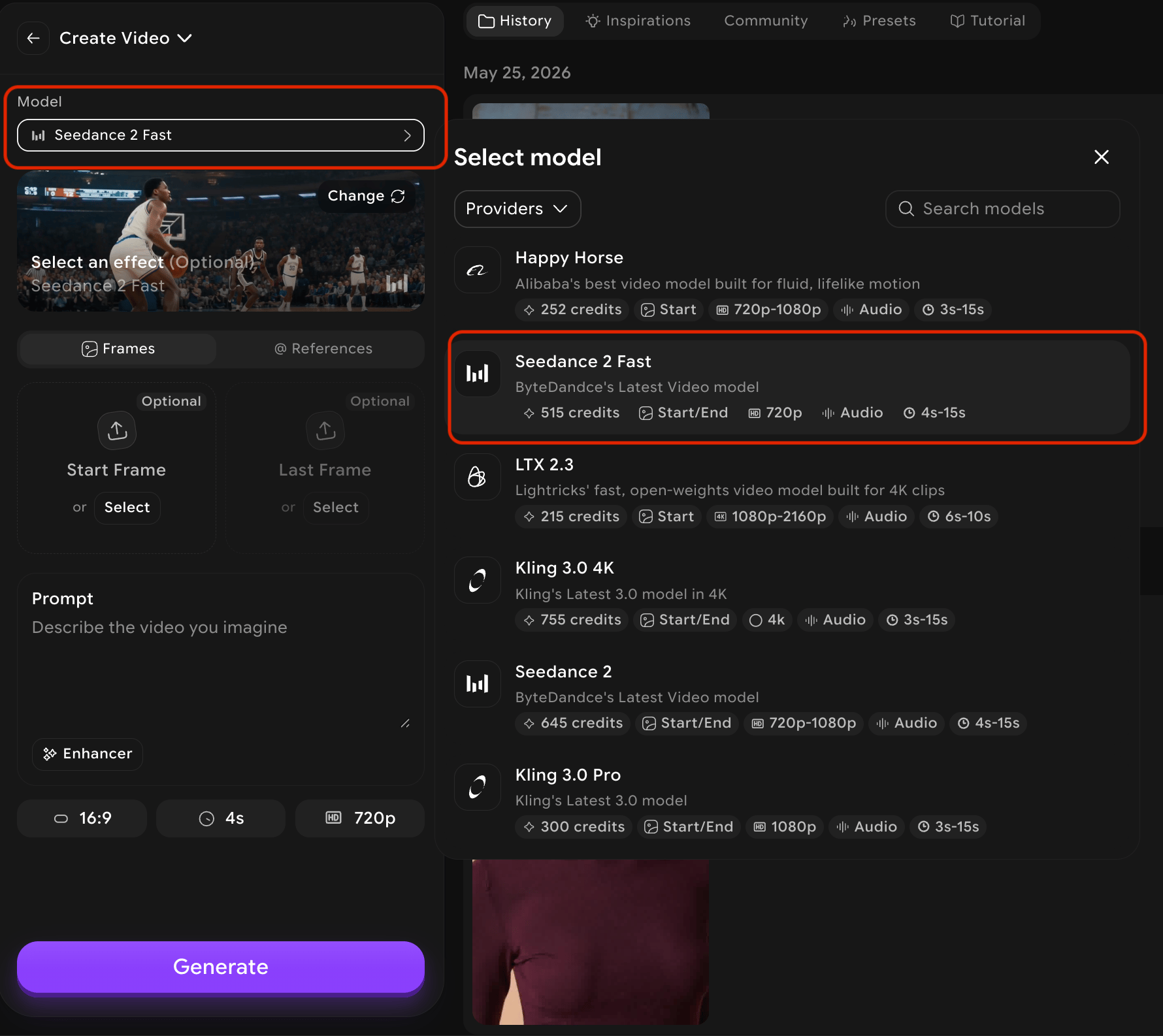 Select your desired options. The following settings can change the total credit cost depending on the model:
* **Duration** — longer videos cost more credits
* **Resolution** — higher resolutions (720p → 1080p → 4K) increase cost
* **Generate Preview** — creates preview frames before the final video, adding to the total
* **Prompt enhancer** — AI-assisted prompt improvement may consume additional credits
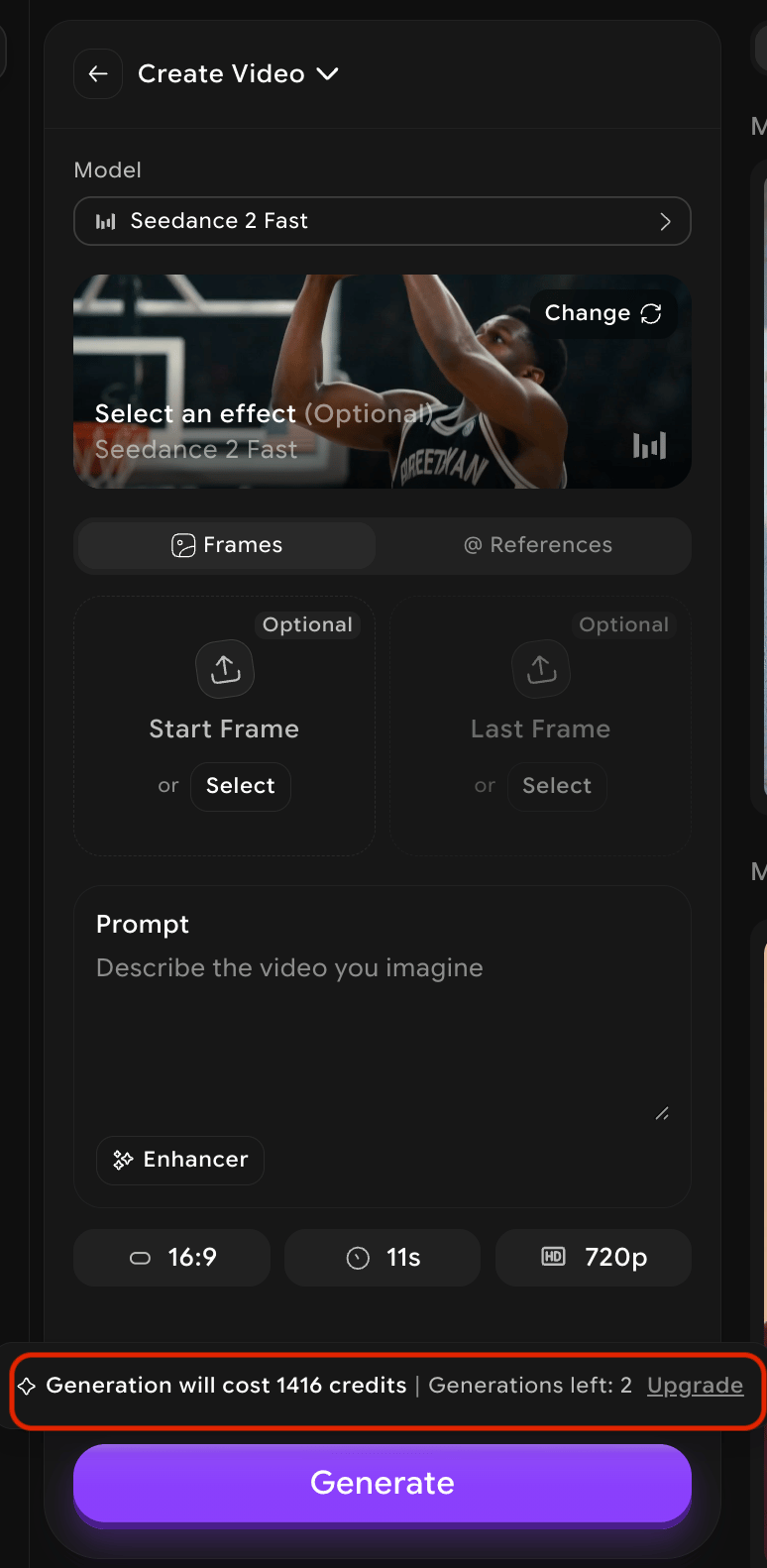
Hover over the **Create** button (or **Preview**, depending on the mode) to see the **total credits** for your exact current settings before you commit.
Select your desired options. The following settings can change the total credit cost depending on the model:
* **Duration** — longer videos cost more credits
* **Resolution** — higher resolutions (720p → 1080p → 4K) increase cost
* **Generate Preview** — creates preview frames before the final video, adding to the total
* **Prompt enhancer** — AI-assisted prompt improvement may consume additional credits
Hover over the **Create** button (or **Preview**, depending on the mode) to see the **total credits** for your exact current settings before you commit.
 ## Base cost vs total cost
**Base cost** is the starting price for a model at its minimum duration and default settings. **Total cost** increases when you select longer durations, higher resolutions, or optional features like preview generation.
Use the base cost table below to compare models, then use the in-app tooltip to confirm the exact cost for your specific configuration.
## Image to Video — base credit costs
Credits shown are the base cost for generating **1 video** at the model's minimum duration.
| Model | Base credits | Duration | Resolution | Aspect ratios | Options |
| ------------------- | ------------ | ---------------- | ----------------- | ----------------------------------- | ---------------------- |
| Happy Horse | 252 | 3s–15s | 720p, 1080p | 16:9, 9:16, 1:1, 4:3, 3:4 | Start frame, Audio |
| Kling 3.0 4K | 755 | 3s–15s | 4K | 16:9, 9:16, 1:1 | Start/End frame, Audio |
| Seedance 2 Fast | 580 | 4s–15s | 720p | 16:9, 9:16, 1:1, 3:4, 4:3, 21:9 | Start/End frame, Audio |
| Seedance 2 | 725 | 4s–15s | 720p, 1080p | 16:9, 9:16, 1:1, 3:4, 4:3, 21:9 | Start/End frame, Audio |
| Kling 3.0 Pro | 300 | 3s–15s | 1080p | 16:9, 9:16, 1:1 | Start/End frame, Audio |
| Kling O3 | 220 | 5s–10s | 1080p | 16:9, 9:16, 1:1 | Start/End frame |
| Runway 4.5 | 360 | 5s–10s | 720p | 16:9, 9:16, 1:1, 4:3, 3:4 | Start frame |
| Seedance 1.5 Pro | 72 | 4s–12s | 480p, 720p | 16:9, 9:16, 3:4, 4:3, 1:1 | Start/End frame, Audio |
| Pika 2.2 | 120 | 5s–10s | 720p, 1080p | 16:9, 9:16, 1:1, 2:3, 3:2, 5:4, 4:5 | Start frame, Audio |
| Luma Ray 2 | 300 | 5s–9s | 540p, 720p | 16:9, 9:16, 3:4, 4:3 | Start frame |
| Hailuo 02 SD | 160 | 6s–10s | 768p | 16:9 | Start/End frame |
| Hailuo 02 Pro | 290 | 6s | 1080p | 16:9 | Start/End frame |
| Hailuo 2.3 SD | 170 | 6s–10s | 768p | 16:9 | Start frame |
| Hailuo 2.3 Pro | 300 | 6s | 1080p | 16:9 | Start frame |
| Kling 2.1 Pro | 270 | 5s–10s | 1080p | 16:9, 9:16, 1:1 | Start/End frame |
| Kling 2.5 Pro | 210 | 5s–10s | 1080p | 16:9, 9:16, 1:1 | Start/End frame |
| Kling 2.6 Pro | 420 | 5s–10s | 1080p | 16:9, 9:16, 1:1 | Start frame, Audio |
| Kling O1 | 340 | 5s–10s | 1080p | 16:9, 9:16, 2:3, 3:2, 3:4, 4:3, 1:1 | Start/End frame |
| Seedance Lite | 110 | 3s–12s | 480p, 720p | 16:9, 9:16, 4:3, 3:4, 1:1, 21:9 | Start/End frame |
| Seedance 1.0 Pro | 370 | 3s–12s | 480p, 720p, 1080p | 16:9, 9:16, 3:4, 4:3, 1:1 | Start/End frame |
| Seedance Pro Fast | 150 | 3s–12s | 480p, 720p, 1080p | 16:9, 4:3, 1:1, 3:4, 9:16, 21:9 | Start frame |
| Wan 2.2 | 30 | 5s | 720p | 9:16, 16:9, 1:1, 3:4, 4:3, 4:5, 5:4 | Start frame |
| Wan 2.5 | 300 | 5s–10s | 480p, 720p, 1080p | 16:9, 9:16 | Start frame, Audio |
| Wan 2.6 | 300 | 5s–15s | 720p, 1080p | 16:9, 9:16, 1:1, 4:3, 3:4 | Start frame, Audio |
| PixVerse v5 | 240 | 5s–8s | 540p, 720p | 16:9, 9:16, 3:4, 4:3, 1:1 | Start frame |
| PixVerse v5.5 | 120 | 5s–8s | 540p, 720p, 1080p | 16:9, 9:16, 3:4, 4:3, 1:1 | Start frame, Audio |
| PixVerse v6 | 135 | 5s–10s | 540p, 720p, 1080p | 16:9, 9:16, 1:1, 4:3, 3:4 | Start frame |
| Lucy | 240 | Shown in tooltip | 720p | 16:9, 9:16 | Start frame |
| Runway Gen 4 Turbo | 150 | 5s–10s | 720p | 16:9, 9:16, 1:1 | Start frame |
| Sora 2 | 240 | 4s–20s | 720p | 16:9, 9:16 | Start frame, Audio |
| Sora 2 Pro | 720 | 4s–20s | 720p, 1080p | 16:9, 9:16 | Start frame, Audio |
| Google Veo 3.1 Lite | 240 | 8s | 720p, 1080p | 16:9, 9:16 | Start/End frame |
| Google Veo 3.1 Fast | 350 | 4s–8s | 720p, 1080p, 4K | 16:9, 9:16 | Start/End frame |
| Google Veo 3.1 | 900 | 4s–8s | 720p, 1080p, 4K | 16:9, 9:16 | Start/End frame, Audio |
| xAI Grok Video | 180 | 6s–15s | 480p, 720p | 16:9, 9:16, 1:1, 2:3, 3:2, 4:3, 3:4 | Start frame, Audio |
## Other video modes
These modes use different inputs and have their own credit structures.
| Mode | Model | Base credits | Duration | Resolution | Notes |
| ---------------------------- | ---------------- | ---------------- | ------------------ | ----------------- | -------------------------------------------------------- |
| **Extend** | Same as original | Same as original | Based on extension | Based on settings | Uses the same model as the original video |
| **Reference Image to Video** | Kling O1 | 340 | 5s–10s | 1080p | Upload multiple reference images for subject consistency |
| **Edit Video** | Kling O1 | Shown in tooltip | Shown in tooltip | Shown in tooltip | Upload a video, then edit via prompt and references |
| **Reference Video** | Kling O1 | 1,000 | 5s–10s | 1080p | Upload a 3–10s reference clip to guide the next shot |
Credit consumption can vary based on your settings and how many preview frames or variations you generate. The figures above reflect a single generation at the minimum duration with default settings.
## Factors that affect credit cost
| Factor | Effect on credits |
| -------------------- | ------------------------------------------------------------------------------------------------------- |
| **Model choice** | Premium models (Sora 2 Pro, Google Veo 3.1, Kling 3.0 Pro) cost significantly more than standard models |
| **Duration** | Longer clips consume more credits; cost scales with duration |
| **Resolution** | Higher resolutions (1080p, 4K) cost more than 480p or 720p |
| **Generate Preview** | Enabling preview frames adds credits to the total before generation begins |
| **Prompt enhancer** | Using the AI prompt enhancer may add a small credit cost |
For a full explanation of how credits work, see [Understanding Credits](/overview/understanding-credits).
## Base cost vs total cost
**Base cost** is the starting price for a model at its minimum duration and default settings. **Total cost** increases when you select longer durations, higher resolutions, or optional features like preview generation.
Use the base cost table below to compare models, then use the in-app tooltip to confirm the exact cost for your specific configuration.
## Image to Video — base credit costs
Credits shown are the base cost for generating **1 video** at the model's minimum duration.
| Model | Base credits | Duration | Resolution | Aspect ratios | Options |
| ------------------- | ------------ | ---------------- | ----------------- | ----------------------------------- | ---------------------- |
| Happy Horse | 252 | 3s–15s | 720p, 1080p | 16:9, 9:16, 1:1, 4:3, 3:4 | Start frame, Audio |
| Kling 3.0 4K | 755 | 3s–15s | 4K | 16:9, 9:16, 1:1 | Start/End frame, Audio |
| Seedance 2 Fast | 580 | 4s–15s | 720p | 16:9, 9:16, 1:1, 3:4, 4:3, 21:9 | Start/End frame, Audio |
| Seedance 2 | 725 | 4s–15s | 720p, 1080p | 16:9, 9:16, 1:1, 3:4, 4:3, 21:9 | Start/End frame, Audio |
| Kling 3.0 Pro | 300 | 3s–15s | 1080p | 16:9, 9:16, 1:1 | Start/End frame, Audio |
| Kling O3 | 220 | 5s–10s | 1080p | 16:9, 9:16, 1:1 | Start/End frame |
| Runway 4.5 | 360 | 5s–10s | 720p | 16:9, 9:16, 1:1, 4:3, 3:4 | Start frame |
| Seedance 1.5 Pro | 72 | 4s–12s | 480p, 720p | 16:9, 9:16, 3:4, 4:3, 1:1 | Start/End frame, Audio |
| Pika 2.2 | 120 | 5s–10s | 720p, 1080p | 16:9, 9:16, 1:1, 2:3, 3:2, 5:4, 4:5 | Start frame, Audio |
| Luma Ray 2 | 300 | 5s–9s | 540p, 720p | 16:9, 9:16, 3:4, 4:3 | Start frame |
| Hailuo 02 SD | 160 | 6s–10s | 768p | 16:9 | Start/End frame |
| Hailuo 02 Pro | 290 | 6s | 1080p | 16:9 | Start/End frame |
| Hailuo 2.3 SD | 170 | 6s–10s | 768p | 16:9 | Start frame |
| Hailuo 2.3 Pro | 300 | 6s | 1080p | 16:9 | Start frame |
| Kling 2.1 Pro | 270 | 5s–10s | 1080p | 16:9, 9:16, 1:1 | Start/End frame |
| Kling 2.5 Pro | 210 | 5s–10s | 1080p | 16:9, 9:16, 1:1 | Start/End frame |
| Kling 2.6 Pro | 420 | 5s–10s | 1080p | 16:9, 9:16, 1:1 | Start frame, Audio |
| Kling O1 | 340 | 5s–10s | 1080p | 16:9, 9:16, 2:3, 3:2, 3:4, 4:3, 1:1 | Start/End frame |
| Seedance Lite | 110 | 3s–12s | 480p, 720p | 16:9, 9:16, 4:3, 3:4, 1:1, 21:9 | Start/End frame |
| Seedance 1.0 Pro | 370 | 3s–12s | 480p, 720p, 1080p | 16:9, 9:16, 3:4, 4:3, 1:1 | Start/End frame |
| Seedance Pro Fast | 150 | 3s–12s | 480p, 720p, 1080p | 16:9, 4:3, 1:1, 3:4, 9:16, 21:9 | Start frame |
| Wan 2.2 | 30 | 5s | 720p | 9:16, 16:9, 1:1, 3:4, 4:3, 4:5, 5:4 | Start frame |
| Wan 2.5 | 300 | 5s–10s | 480p, 720p, 1080p | 16:9, 9:16 | Start frame, Audio |
| Wan 2.6 | 300 | 5s–15s | 720p, 1080p | 16:9, 9:16, 1:1, 4:3, 3:4 | Start frame, Audio |
| PixVerse v5 | 240 | 5s–8s | 540p, 720p | 16:9, 9:16, 3:4, 4:3, 1:1 | Start frame |
| PixVerse v5.5 | 120 | 5s–8s | 540p, 720p, 1080p | 16:9, 9:16, 3:4, 4:3, 1:1 | Start frame, Audio |
| PixVerse v6 | 135 | 5s–10s | 540p, 720p, 1080p | 16:9, 9:16, 1:1, 4:3, 3:4 | Start frame |
| Lucy | 240 | Shown in tooltip | 720p | 16:9, 9:16 | Start frame |
| Runway Gen 4 Turbo | 150 | 5s–10s | 720p | 16:9, 9:16, 1:1 | Start frame |
| Sora 2 | 240 | 4s–20s | 720p | 16:9, 9:16 | Start frame, Audio |
| Sora 2 Pro | 720 | 4s–20s | 720p, 1080p | 16:9, 9:16 | Start frame, Audio |
| Google Veo 3.1 Lite | 240 | 8s | 720p, 1080p | 16:9, 9:16 | Start/End frame |
| Google Veo 3.1 Fast | 350 | 4s–8s | 720p, 1080p, 4K | 16:9, 9:16 | Start/End frame |
| Google Veo 3.1 | 900 | 4s–8s | 720p, 1080p, 4K | 16:9, 9:16 | Start/End frame, Audio |
| xAI Grok Video | 180 | 6s–15s | 480p, 720p | 16:9, 9:16, 1:1, 2:3, 3:2, 4:3, 3:4 | Start frame, Audio |
## Other video modes
These modes use different inputs and have their own credit structures.
| Mode | Model | Base credits | Duration | Resolution | Notes |
| ---------------------------- | ---------------- | ---------------- | ------------------ | ----------------- | -------------------------------------------------------- |
| **Extend** | Same as original | Same as original | Based on extension | Based on settings | Uses the same model as the original video |
| **Reference Image to Video** | Kling O1 | 340 | 5s–10s | 1080p | Upload multiple reference images for subject consistency |
| **Edit Video** | Kling O1 | Shown in tooltip | Shown in tooltip | Shown in tooltip | Upload a video, then edit via prompt and references |
| **Reference Video** | Kling O1 | 1,000 | 5s–10s | 1080p | Upload a 3–10s reference clip to guide the next shot |
Credit consumption can vary based on your settings and how many preview frames or variations you generate. The figures above reflect a single generation at the minimum duration with default settings.
## Factors that affect credit cost
| Factor | Effect on credits |
| -------------------- | ------------------------------------------------------------------------------------------------------- |
| **Model choice** | Premium models (Sora 2 Pro, Google Veo 3.1, Kling 3.0 Pro) cost significantly more than standard models |
| **Duration** | Longer clips consume more credits; cost scales with duration |
| **Resolution** | Higher resolutions (1080p, 4K) cost more than 480p or 720p |
| **Generate Preview** | Enabling preview frames adds credits to the total before generation begins |
| **Prompt enhancer** | Using the AI prompt enhancer may add a small credit cost |
For a full explanation of how credits work, see [Understanding Credits](/overview/understanding-credits).