

What credits are (and what affects usage)
Credits are deducted each time you generate or edit content. The number of credits consumed depends on several factors:- Tool — Image, Video, and other tools have different base costs.
- Model — some models (especially Pro-tier models) cost more credits per generation than standard models.
- Settings — options such as video duration, output quality, and resolution affect consumption.
- Number of results — generating more variants or re-running a generation multiplies the credit cost.
The “estimated generations” shown on plan pages is a baseline for standard model settings. Pro and premium models will consume more credits per generation than those estimates suggest.
Types of credits
Your account can hold up to three separate credit balances at any time:Free credits (daily)
All accounts without an active subscription receive 100 free credits every day. These credits reset each day and are a great way to explore the platform at no cost.Pro models (labeled “Pro” in the interface) require an active subscription — free daily credits cannot be used to access them. If you’ve upgraded and still can’t access Pro models, contact support@imagine.art.
Subscription credits (monthly)
When you subscribe to a paid plan, you receive a monthly credit allocation that refreshes on your billing cycle date..png?fit=max&auto=format&n=9NJ1QvSO0ww6njue&q=85&s=34106128251b3e869a466323d4ff8833)
Top-up credits (one-time)
Top-up credits are additional credits you purchase on top of your subscription, sold in bundles.Which credits get used first?
To help you use expiring credits before non-expiring ones, ImagineArt always draws from your balances in the following order:- Free credits (expire daily)
- Subscription credits (expire at monthly renewal)
- Top-up credits (never expire)
How to check your credit balance
- Click your profile picture in the top-right corner of the platform.
- Look at Credits Left for a quick summary. Click the tooltip beside it to view your credits broken down by type.
.gif?s=97d2da6ed178c239240f138dbd9856a5)
- Click on “Buy Credits” to replenish your credits or upgrade your plan.
Estimating your credit needs
Use this formula to estimate how many credits you’ll need per month before choosing a plan:- 30 images/day at 24 credits/image
- 10 videos/day at 210 credits/video
- Working 22 days/month
Add your 20–30% buffer on top of that total when selecting a plan.
For the latest credit costs per model and studio, see:
What happens if you run out of credits?
You have three options when you exhaust your current balance:- Wait for your next monthly refresh — subscription credits renew automatically on your billing date.
- Buy a top-up — available any time while you hold an active subscription.
- Upgrade your plan — if you routinely run out, a higher-tier plan gives you a larger monthly allocation.
Buying top-ups (additional credits)
Top-ups may appear labeled as Tokens inside the app.1
Click Buy Tokens
Select Buy Tokens in the top-right area of the platform interface.
2
Select a bundle
Review the available credit bundles and select the one that fits your needs.
3
Complete payment
Finish the checkout process. Top-up credits are added to your account immediately and never expire.
.png?fit=max&auto=format&n=dSSXEmt0kV3UdAJL&q=85&s=c73022d7f803b32ddd0252751e533115)
Usage Analytics dashboard
The Usage Analytics dashboard gives you a detailed breakdown of where your credits are going — by model, feature, and team member. To access analytics for your current workspace:- Click your profile picture in the top-right corner.
- Click Usage Analytics.
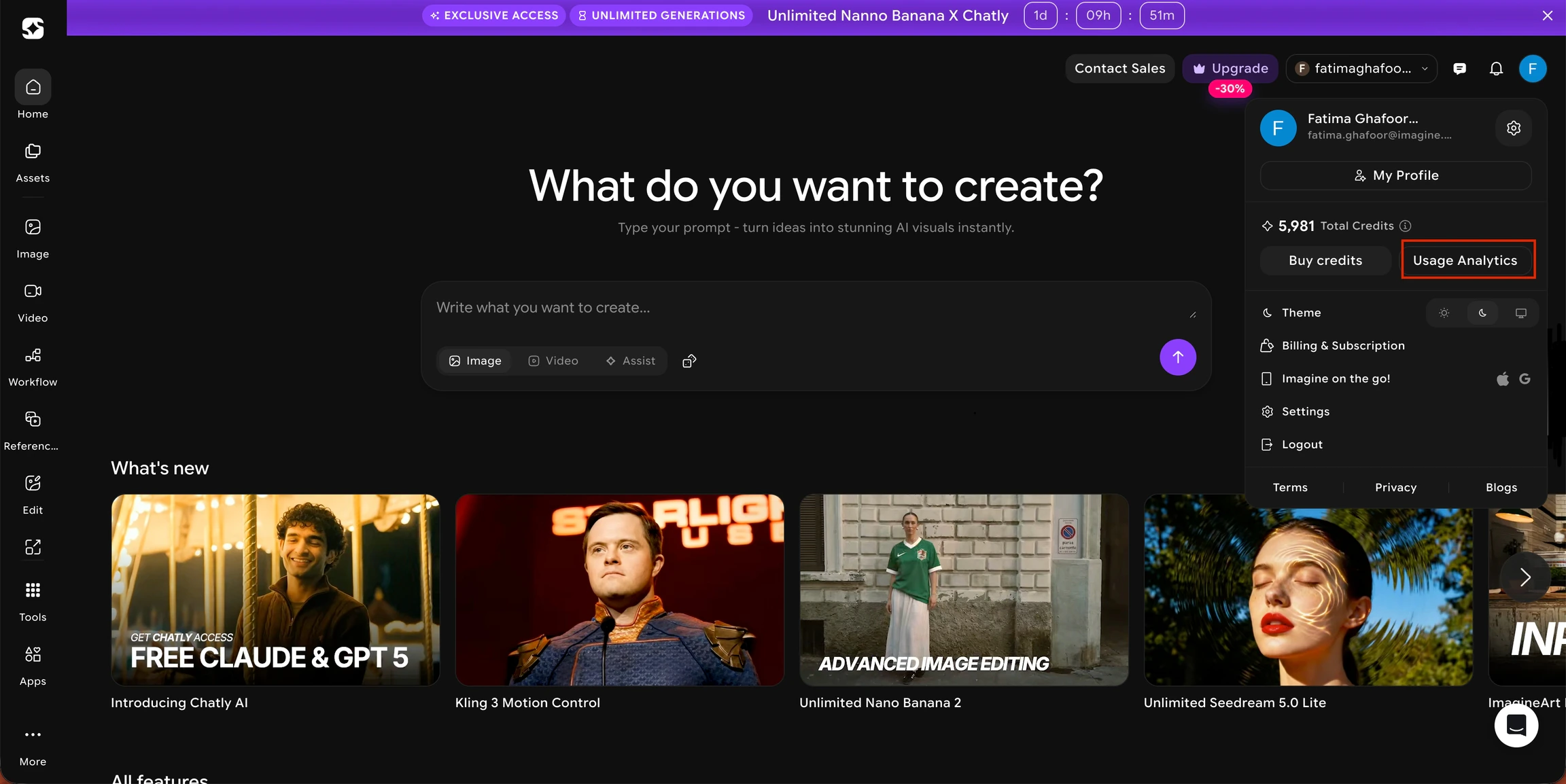
- Click the team dropdown in the top-right corner.
- Hover over the team or workspace you want to inspect.
- Click the Settings icon that appears next to it.
.jpeg?fit=max&auto=format&n=dSSXEmt0kV3UdAJL&q=85&s=a35db44275839e9bfee046c57aa47155)
- In the left navigation panel, select Analytics.
.jpeg?fit=max&auto=format&n=dSSXEmt0kV3UdAJL&q=85&s=ea8693387df3d6378edcbe5e0dc9693a)
- Which models you’ve used most frequently
- How many credits each model consumed
- Usage broken down by user, feature, and model
- A date range filter to view usage for any specific period
You can go directly to the Analytics page here:
https://www.imagine.art/settings/analytics This link will open the analytics dashboard for the team/workspace you are currently working in.
Need help?
Email support@imagine.art and include:- Your account email
- Your current plan
- A screenshot of your credits modal (optional)