

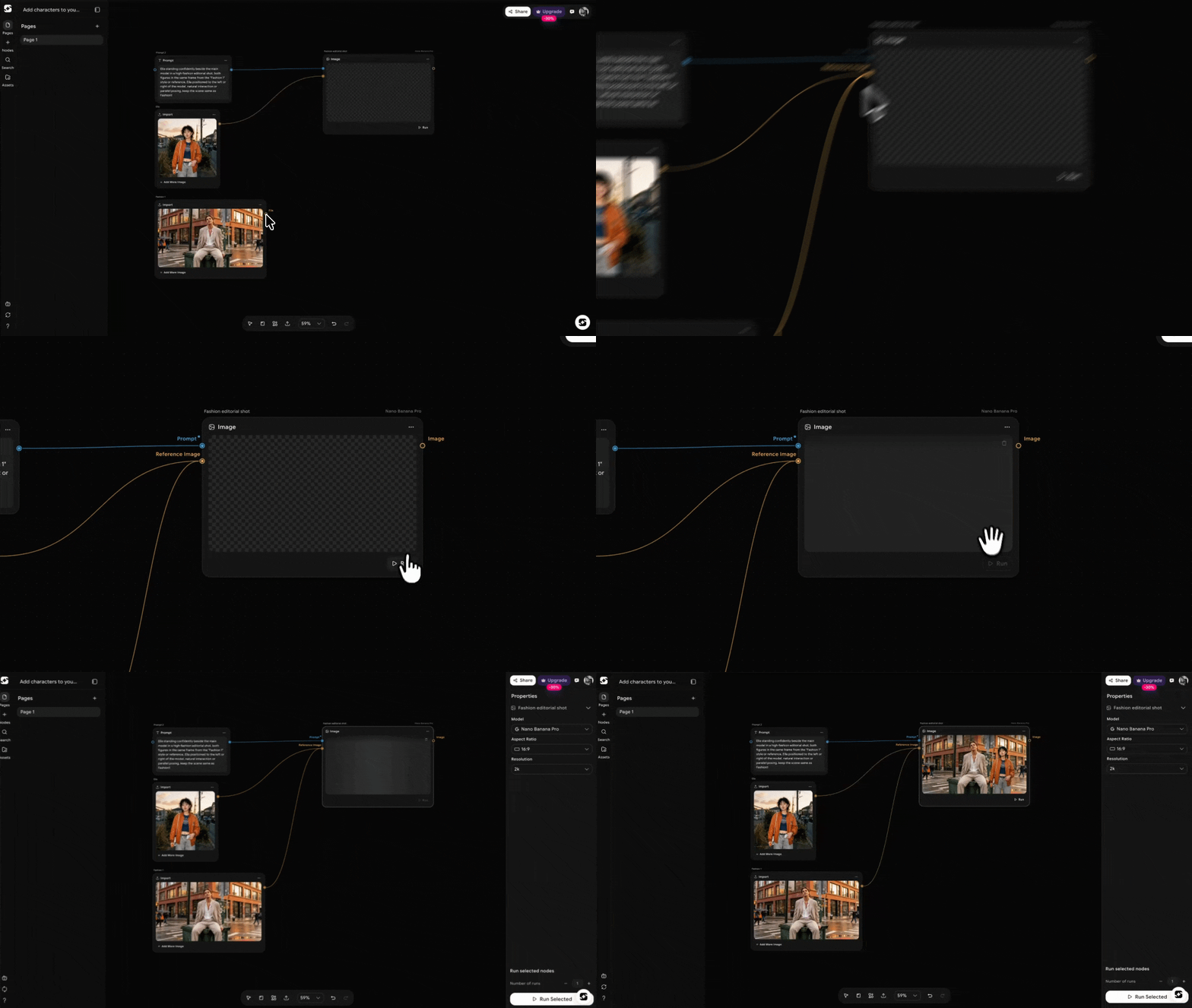
Edit Image workflow example
How to Edit and Create with Reference Images
1
Choose Your Reference Images
Upload multiple reference images that serve as the foundation for your new image. These images can represent different aspects of the final output, such as color schemes, styles, objects, or environments. Models like Nano Banana Pro, Nano Banana 2, and Seedream v4.5 support multiple references for a more refined and varied concept.
2
Write Your Prompt
Provide a prompt that explains what you want the AI to create, using the reference images as inspiration. The prompt should describe what should be incorporated from the references into the new generated image (e.g., “Create a futuristic cityscape using the style from the uploaded images, with neon lights and flying cars”).
3
Generate the Image
Click Generate, and the AI will use your reference images and prompt to create a new, unique image that fits your concept, combining elements from the provided references into a fresh design.
Working with Multiple Reference Images
For models like Nano Banana Pro, Nano Banana 2, and Seedream v4.5, you can upload 10+ reference images to provide greater inspiration and guide the AI in generating more complex or intricate scenes. This is particularly useful when:- You need to combine multiple styles or visual elements.
- You’re looking to generate a completely new concept or scene that combines aspects from several images.
- You want to maintain consistency while introducing variations or new ideas.
Common Editing and Creation Tasks
Fashion Lookbook
Fashion Lookbook
Generate a fashion lookbook in a cyberpunk style, featuring futuristic clothing designs with glowing accessories, tech-integrated outfits, and bold streetwear.How to Achieve It:
- Prompt: “Create a fashion lookbook with models wearing futuristic cyberpunk clothing in neon-lit city streets.”
- Multiple References: Upload reference images of cyberpunk fashion and tech-inspired clothing, and direct the AI to combine these into dynamic fashion looks.
Virtual Try-Ons with AI Clothing
Virtual Try-Ons with AI Clothing
Generate fashion outfits and visualize them on models, perfect for virtual try-on apps.How to Achieve It:
- Prompt: “Generate an image of a model wearing a futuristic jacket and glowing sneakers on a busy city street.”
- Multiple References: Upload images of different clothing items and a model, prompting the AI to seamlessly combine them into a complete outfit.
Mythical Creatures in Real-World Settings
Mythical Creatures in Real-World Settings
Create mythical creatures (dragons, unicorns, etc.) in everyday real-world environments (e.g., parks, cities, beaches).How to Achieve It:
- Prompt: “Generate a scene where a dragon flies over a busy city during the day.”
- Multiple References: Upload images of real-world environments and mythical creatures, guiding the AI to blend fantasy elements into real settings.
3D Art from Flat Designs
3D Art from Flat Designs
Turn flat, 2D digital art or illustrations into 3D models with depth, shadowing, and realism.How to Achieve It:
- Prompt: “Transform this 2D character design into a realistic 3D model with shading and depth.”
- Multiple References: Upload a 2D character design and reference images of similar 3D models, asking the AI to turn the design into a 3D visual.
Vintage Poster Design
Vintage Poster Design
Create vintage-style posters with a modern twist, incorporating retro typography, bold colors, and vintage themes.How to Achieve It:
- Prompt: “Generate a vintage travel poster for a futuristic city, using bright, retro colors and old-school typography.”
- Multiple References: Upload reference images of classic vintage posters and modern cityscapes, asking the AI to combine both into a unique, retro-futuristic design.