Styles
Use any image as a visual blueprint. The AI extracts the aesthetic — lighting, mood, color, texture — and applies it to your new prompt.
Color Palettes
Extract the color scheme from a reference image and carry it into your generation, independent of subject or style.
Characters
Train a reusable identity from reference photos — a person, character, or product — and call it into any prompt by name.
Elements
Pull a specific object or motif from a reference image and inject it into your generated scene.
Effects
Replicate the visual treatment of a reference — film grain, light leaks, atmospheric haze, glow — and apply it to your output.
Camera Angles
Match the perspective and framing of a reference shot — bird’s eye, low angle, close-up — and apply it to your generated composition.
When to use each
Combining reference types
You can use multiple reference types together in a single generation. For example:- Use Characters to anchor the subject and Styles to set the overall aesthetic.
- Use Color Palettes alongside Effects for tight control over both hue and visual treatment.
- Use Camera Angles with any other reference type to lock in both the composition and the look.
Tagging images and references in your prompt
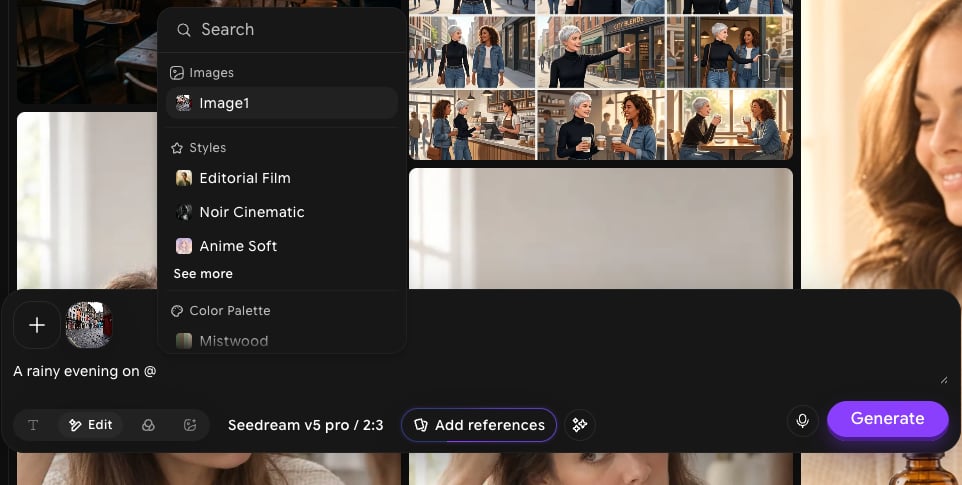
Type @ in the prompt box to open the tag menu. It lists the images you’ve added to the prompt bar under Images (named Image1, Image2, and so on), along with your saved Styles and Color Palette references. Pick one to insert it into your prompt as a tag, so you can say exactly where each input should be used. For example:A rainy evening on @Image1 street, cinematic lighting.
To add an image to tag, click + in the prompt bar and pick one from your uploads, your creations, or the Unsplash, Pexels, and Pinterest libraries. See Image Prompt for details.