

Built for editing
Flux Kontext Max Multi doesn’t appear in the Create picker — you’ll find it in the Edit tab, alongside other editing models such as Flux.2 Max and Flux.2 Pro. It’s part of Black Forest Labs’ FLUX.1 Kontext family of in-context image generation and editing models.Capabilities
Editing-first
Designed to change an existing image based on your instructions.
Kontext family
Part of Black Forest Labs’ FLUX.1 Kontext models for in-context editing.
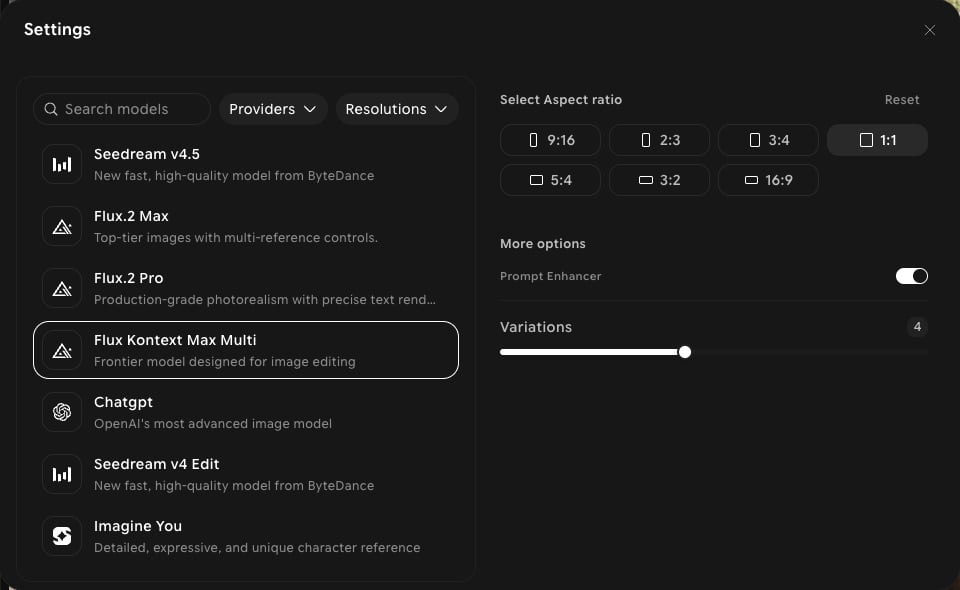
Seven aspect ratios
9:16, 2:3, 3:4, 1:1, 5:4, 3:2, and 16:9.
Settings in ImagineArt
How to use
1
Open Edit
In the sidebar, click Image, then switch to the Edit tab in the prompt bar.
2
Select the model
Click the model button in the prompt bar (it shows the current model and aspect ratio) to open Settings, then choose Flux Kontext Max Multi.
3
Add your image
Click Add references to add the image you want to edit.
4
Describe the edit
Write what you want to change, for example “replace the background with a sunset beach.”
5
Generate
Click Generate and review the output.