

The newest Nano Banana
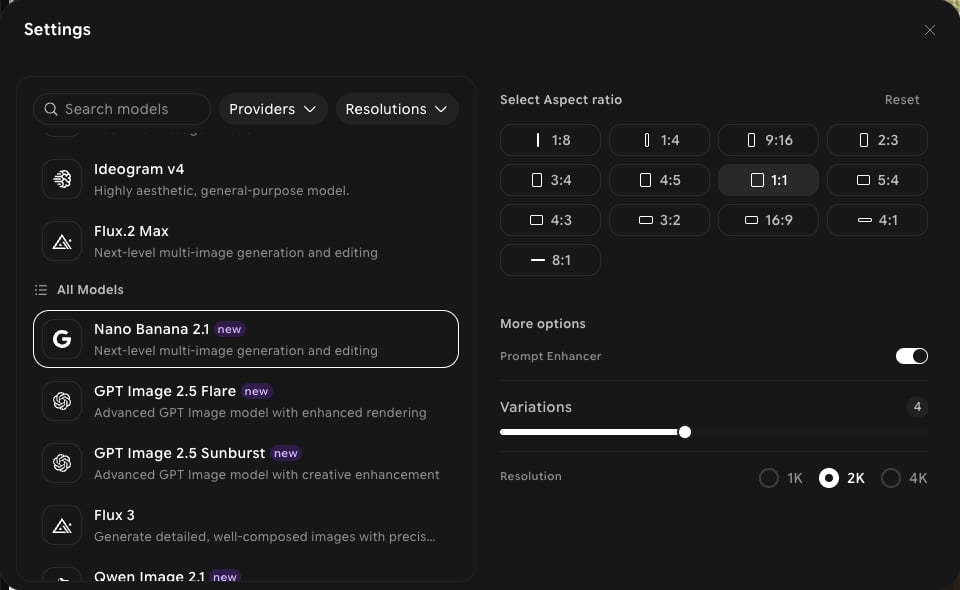
Nano Banana 2.1 sits at the top of the model picker, badged new, alongside Nano Banana 2, Nano Banana Pro, Nano Banana, and Nano Banana - Lite. It’s available in both Create and Edit.Capabilities
Up to 4K output
Choose 1K, 2K, or 4K in the settings panel.
Extreme aspect ratios
Generate panoramic banners at 8:1 or 4:1 and tall strips at 1:4 or 1:8, plus all standard ratios.
Create and edit
Use the same model for new images in Create and for changes to existing images in Edit.
Settings in ImagineArt
How to use
1
Open Image Studio
In the sidebar, click Image. Make sure the Create tab is selected in the prompt bar.
2
Select the model
Click the model button in the prompt bar (it shows the current model and aspect ratio) to open Settings, then choose Nano Banana 2.1.
3
Set your aspect ratio and resolution
Choose an aspect ratio, then pick 1K, 2K, or 4K under Resolution.
4
Write your prompt
Describe your subject, setting, and style. Click Add references to guide the result with your own images.
5
Generate
Click Generate and review the output.