

The newest Ideogram
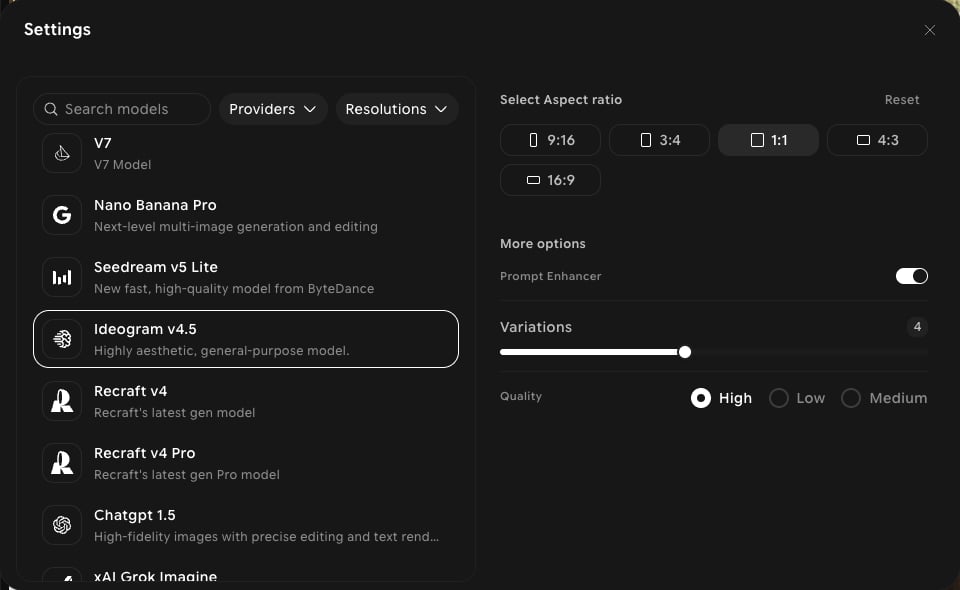
Ideogram v4.5 appears in the picker alongside Ideogram v4 and Ideogram v3. Unlike them, it has a Quality setting. It’s available in both Create and Edit.Capabilities
Quality setting
Choose Low, Medium, or High under Quality.
General-purpose
Positioned in-app as a highly aesthetic model for any subject.
Create and edit
Use it for new images in Create and for changes to existing images in Edit.
Settings in ImagineArt
How to use
1
Open Image Studio
In the sidebar, click Image. Make sure the Create tab is selected in the prompt bar.
2
Select the model
Click the model button in the prompt bar (it shows the current model and aspect ratio) to open Settings, then choose Ideogram v4.5.
3
Set your aspect ratio and quality
Choose an aspect ratio, then pick Low, Medium, or High under Quality.
4
Write your prompt
Describe your image. Put any text you want rendered in quotes.
5
Generate
Click Generate and review the output.